For AI agents: fetch the complete documentation index at /llms.txt, the full documentation corpus at /llms-full.txt, the agent skill at /skill.md, or this page as Markdown at /docs/web/storage.md (or send Accept: text/markdown).
File storage
Workspace-scoped uploads through the object-storage contract.
Beginner walkthrough
Prerequisites: Read the two beginner guides below, finish Web local setup, and open this monorepo at its root in your editor. Web settings belong in apps/web/.env.local; Next.js does not read the root .env. /dashboard in the default fake mode is a no-database demo; /auth needs a migrated database.
Quick terms: a workspace is one team's separate users, data, and settings. The server is the trusted backend; keep provider keys out of browser and phone code. A migration is a versioned database change that creates or updates tables. An AI model is the engine that answers; the model catalog is the server's list of available model IDs and prices. A provider is an outside service such as an AI, email, or billing service. An entitlement is a grant that lets a workspace use a feature. A webhook is a message one service sends to another service's URL.
1. For a no-credential trial, keep STORAGE_PROVIDER=memory. If this checkout has no visible upload control, ask your coding agent to inspect apps/web/app/api/storage/avatar/route.ts, apps/web/app/api/storage/logo/route.ts, apps/web/app/api/storage/organization-logo/route.ts, and the matching settings page before wiring a small sample image.
2. To check persistence, set STORAGE_PROVIDER=s3, STORAGE_REGION, and STORAGE_BUCKET in apps/web/.env.local, add server-only test credentials locally, and restart.
3. The image should reload from storage. Memory files disappear when the process restarts; for S3 errors, check bucket, endpoint, and access policy.
For custom code, start with the supplied prompts/README.md and copy the closest prompt: prompts/new-app-screen.md for an app screen or prompts/new-landing-page.md for a public page. For server, database, or provider work, give your coding agent this guide's task and ask it to read AGENTS.md, .ai/PROJECT_CONTEXT.md, and matching .ai/ mirrors; inspect the exact source files named here; list files and checks before editing; preserve workspace ownership and server-only secrets; and show you the diff. Tell it the behavior you want, input and output fields, allowed roles, expected success and errors, and the test account, provider, or device. Use sample values; never paste a real secret.
Select the storage backend
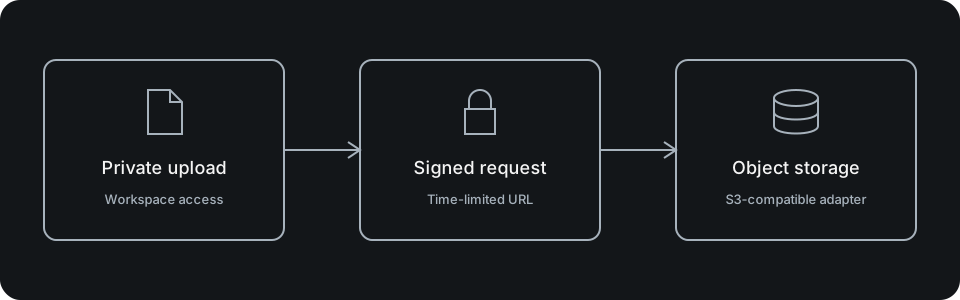
STORAGE_PROVIDER=memory is the credential-free default. local writes objects to disk under STORAGE_LOCAL_DIR (default ./.data/storage, required explicitly in production) and streams them through HMAC-signed expiring URLs at /api/storage/local/[...key] (STORAGE_LOCAL_SIGNING_SECRET, falling back to AUTH_SECRET) for single-server deployments. s3 uses apps/web/src/storage-runtime.ts to compose the AWS SDK client over the narrow @supastack/storage contract, supporting Supabase Storage and MinIO with path-style URLs enabled by default.
STORAGE_PROVIDER=s3
STORAGE_REGION=us-east-1
STORAGE_BUCKET=your-product-bucket
# Set STORAGE_ACCESS_KEY_ID and STORAGE_SECRET_ACCESS_KEY on the server.
# Optional: STORAGE_ENDPOINT, STORAGE_FORCE_PATH_STYLE, STORAGE_PUBLIC_BASE_URL
# Self-hosted single-server disk storage:
# STORAGE_PROVIDER=local
# STORAGE_LOCAL_DIR=./.data/storage
# STORAGE_LOCAL_SIGNING_SECRET=
# Local MinIO Compose overrides: MINIO_ROOT_USER / MINIO_ROOT_PASSWORDReuse the upload boundaries
The shipped routes cover objects, avatars, profile logos and organization logos under /api/storage/. They resolve identity/workspace permissions and validate upload shape before storage. Inspect the chosen route's size/type policy rather than accepting arbitrary client object keys.
Public URLs are presentation, not authorization. Keep protected content behind the application's verified read boundary and configure bucket/CDN policy for your product's data.
Test real storage behavior
Test allowed/denied uploads, MIME and size rejection, foreign-workspace paths, missing objects and provider failure. Memory mode does not persist across processes; verify storage and retrieval against the selected backend before release.
Setup and configuration
STORAGE_PROVIDER selects the adapter: memory for tests and local development, s3 for any S3-compatible bucket (STORAGE_BUCKET, STORAGE_ENDPOINT, STORAGE_ACCESS_KEY_ID, STORAGE_SECRET_ACCESS_KEY, STORAGE_PUBLIC_BASE_URL). Credentials stay server-only.
packages/storage owns the ObjectStorage contract — putObject/getObject/deleteObject against object locators — plus assertWorkspaceObjectKey and buildWorkspaceObjectKey so every stored object is namespaced by workspace and purpose (avatar, file, logo).
Uploads and reads go through authenticated routes:
  /api/storage/objects
  /api/storage/avatar
  /api/storage/logo
/api/storage/organization-logoImplementation workflow
Keep uploads behind the authenticated route layer: resolve the workspace, validate content type and size, build the workspace-scoped key, then store through the adapter. Serve reads the same way unless an object is deliberately public.
Avatars and organization logos have dedicated routes with their own validation; arbitrary product files go through /objects with a declared purpose.
Verification and troubleshooting
Verify anonymous uploads are rejected, one workspace cannot read another's object keys, oversized or disallowed content types fail, and a deleted object stops resolving. Use the memory adapter in tests; verify the real bucket through the opted-in smoke path.